network scanners
Nmap
Open-source network discovery and security auditing tool with a powerful scripting engine.
Use with authorization only. Scan networks and hosts you own or have explicit written permission to assess. Unauthorized scanning can violate acceptable-use policies and, in some jurisdictions, the law.
Nmap (short for Network Mapper) is the tool most working admins reach for when they need to know exactly what is on a network and what it is running. It is made by the Nmap Project, the long-running open-source effort started by Gordon Lyon (you will see him online as “Fyodor”). If you look after a small or mid-sized office network, here is the honest positioning: Nmap is the most capable free scanner you can install, and also the one most likely to make you feel out of your depth on day one. It rewards people who are comfortable at a command line and don’t mind reading documentation.
What Nmap actually does
At its core, Nmap answers three questions: which hosts on this network are alive, which ports on those hosts are open, and what is listening behind those ports. It sends carefully shaped packets, watches how each machine responds, and builds a picture from the replies.
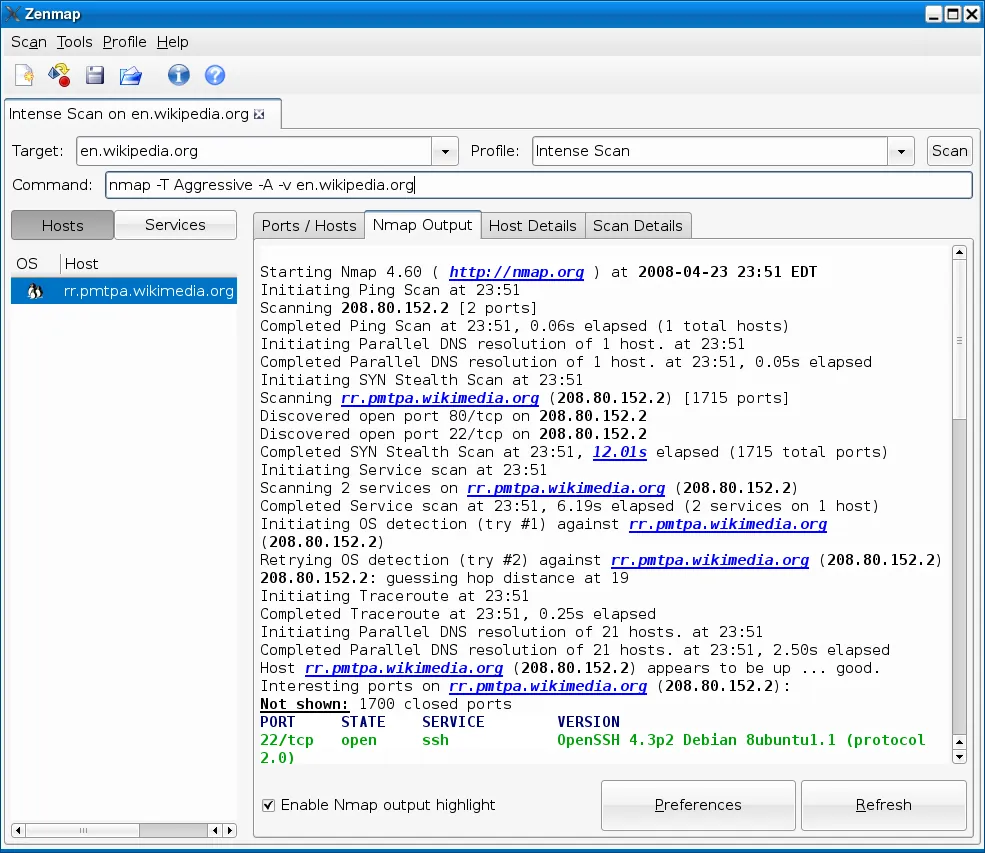
Beyond that basic sweep, it does service and version detection — so instead of “port 443 is open” you get “this looks like a specific web server, roughly this version.” It attempts OS fingerprinting by comparing response quirks against a large database. And it ships the Nmap Scripting Engine (NSE), a library of scripts (written in Lua) that automate everything from grabbing banners to checking for well-known misconfigurations. There is an official graphical front end, Zenmap, plus companion utilities like Ncat, Nping, and Ndiff for comparing two scans to see what changed.
Where it shines
Depth. Nothing else on the free end of the spectrum tells you as much about a host. When you need to inventory services for patching, confirm a firewall is actually blocking what you think it blocks, or check what a new device is exposing, Nmap gives you a level of detail that GUI point-and-click scanners simply don’t.
Scriptability and repeatability. Because it is command-line first, you can save a scan as a one-line command, drop it in a cron job or a script, and run the exact same audit next month. Pair that with Ndiff and you have a lightweight way to spot “something new opened a port that wasn’t open before” — genuinely useful for a small team with no monitoring budget.
It’s everywhere and well documented. Nmap has been around for decades, so almost any problem you hit has already been answered somewhere, and its reference material is thorough and free.
Where it falls short
The learning curve is real. The flags are terse, the output is dense, and it is easy to run a scan that is slower than it needs to be or that misses hosts because you picked the wrong discovery method. If you just want a table of “what’s on my Wi-Fi right now,” Nmap is more tool than you need and the first hour can be frustrating.
It is not a monitoring system. Nmap takes a snapshot; it does not watch your network continuously, alert you, or keep a tidy asset database over time. You bolt that on yourself with scripts, or you use a different category of product.
Aggressive scans can upset things. Version detection and heavy NSE scripts can trip intrusion-detection systems or, rarely, disturb fragile devices like old printers or industrial gear. On a production network you scan deliberately, not with every option turned up.
Who it’s for
Reach for Nmap if you are the technical person on a team, you are comfortable in a terminal (or willing to get there), and you want one free tool that will still be useful as your questions get harder. It is ideal for security-minded audits, verifying firewall rules, and building repeatable checks. If you are an office manager who just needs to see which devices are connected, or you want a friendly Windows helpdesk tool, you will likely be happier starting somewhere gentler and keeping Nmap in reserve.
Licensing and cost
Nmap is free and open-source, distributed under the Nmap Public Source License (NPSL) — a license the project maintains that draws on the GPL with some added terms. For ordinary in-house use you can download and run it at no cost. If you plan to redistribute it or bundle it inside a commercial product, read the license text carefully or contact the project, because those scenarios have specific conditions.
How it compares
Angry IP Scanner is the friendlier cross-platform alternative: a graphical tool that gives you a fast host-and-port table in seconds. It trades Nmap’s depth and scripting for approachability, and it is the sensible pick when you don’t need service fingerprinting.
Advanced IP Scanner is Windows-only freeware aimed at helpdesk work — device discovery, shared folders, remote actions — with almost no learning curve. It cannot do what NSE does, but for “who is on the LAN and can I remote in,” it is quicker to results.
Wireshark is not really a competitor; it answers a different question. Where Nmap maps hosts and ports, Wireshark inspects the actual packets when you need to understand why a connection is failing. Many admins keep both.
Getting it safely
Get Nmap from the Nmap Project’s official site (nmap.org) or from a trusted operating-system package repository. We are an independent review portal — we host nothing and distribute no installers. Because scanners are a favorite thing for bad actors to trojan, always confirm you have the genuine file: see our short guide on how to verify a download. And scan only networks you own or have written permission to assess — start with our authorization checklist before you point it at anything.
FAQ
Is Nmap safe to run on my own network? Yes, on networks you control. A basic discovery scan is gentle. Just be a little careful with aggressive version detection or heavy scripts against fragile devices, and avoid blasting a production network during business hours.
Do I have to use the command line? Not strictly — Zenmap, the official GUI, wraps common scans in a visual interface and even shows you the command it builds. But you will get the most out of Nmap once you are comfortable typing scans directly.
Is Nmap enough on its own for network monitoring? No. It is a scanner, not a monitor. It tells you what is there right now. For ongoing alerts and history you would add scripting or move to a dedicated monitoring product.
Guides
About the project
Nmap is developed and maintained by Nmap Project. This is an independent catalog — we don't host or distribute the software. For source code, documentation and official releases, see the project's own site.
same segment
Alternatives in Network Scanners
Open-source packet analyzer for network troubleshooting, analysis and protocol inspection.
by Wireshark FoundationLightweight, cross-platform open-source IP address and port scanner.
by Anton KeksFree Windows LAN scanner for device discovery, shared folders and remote access.
by Famatech